{
"version": "https://jsonfeed.org/version/1.1",
"title": "Nick Karnik",
"home_page_url": "https://nick.karnik.io/blog",
"feed_url": "https://nick.karnik.io/feed.json",
"description": "Essays on building software, search, AI, and engineering leadership.",
"language": "en-US",
"authors": [
{
"name": "Nick Karnik",
"url": "https://nick.karnik.io"
}
],
"items": [
{
"id": "https://nick.karnik.io/blog/how-to-tell-if-a-model-is-good-enough",
"url": "https://nick.karnik.io/blog/how-to-tell-if-a-model-is-good-enough",
"title": "How to Tell If a Model Is Good Enough",
"summary": "Learn why accuracy is a trap, and how precision and recall reveal what really matters when evaluating machine learning models.",
"content_text": "In late 2006, I built a sentiment classifier for MSN Shopping. Precision and recall were the gatekeepers. Those numbers decided whether the model shipped or went back for more work.\n\nIt took months of effort. Labeling data, tuning features, retraining, evaluating again. With LLMs today, the same thing can be done in minutes.\n\nWhat has not changed is how you measure whether the model is actually good.\n\n## The problem with accuracy\n\nAccuracy is a single number that tells you how often the model is right. What it hides is what kind of wrong it was when it missed.\n\nMissing a negative review and falsely flagging a positive one both count the same. But for a support team triaging complaints, those mistakes cost very different things.\n\nIt also breaks down completely when the data is imbalanced. If only 5% of reviews are negative, a model that calls everything positive is 95% accurate without doing anything useful at all.\n\n## Precision: when the model says yes\n\nPrecision measures the quality of positive predictions. Out of everything the model flagged as positive, how much actually was?\n\n\n\n**Precision = True positives / (True positives + False positives)**\n\nLow precision means too many false alarms. The model flags aggressively but a lot of those flags are wrong.\n\n
\n\nA spam filter with low precision is a good example. It catches most spam, but it also routes real emails to your junk folder. The flags are not reliable enough to trust.\n\n## Recall: what the model misses\n\nRecall measures coverage. Out of all the things that were actually positive, how many did the model find?\n\n\n\n**Recall = True positives / (True positives + False negatives)**\n\nLow recall means too many missed cases. The model is cautious and only flags what it is very confident about.\n\n
\n\nA medical screening tool with low recall is dangerous. It might have clean, accurate flags, but it is quietly missing real cases that needed to be caught.\n\n## What this looks like in practice\n\n**Sentiment classifier on 1,000 electronics reviews**\n\n100 reviews are genuinely negative.\n\nThe model flags 120 as negative.\n\nOf those 120, only 80 are actually negative. The other 40 are positive or neutral reviews it got wrong.\n\nOf the 100 real negative reviews, the model caught 80 and missed 20.\n\n\n\n**Precision:** 80 / 120 = 67%\n\n**Recall:** 80 / 100 = 80%\n\n
\n\nThe model catches most of the real negative reviews but a third of its flags are wrong. Whether that tradeoff is acceptable depends on what you plan to do with the output. If you are surfacing complaints to a support team, false flags waste their time. If you are routing reviews for moderation, missing a real negative review is worse.\n\n## Why you cannot have both\n\nPrecision and recall move in opposite directions. Most classifiers output a confidence score and you set a threshold to decide what counts as a positive prediction.\n\nRaise the threshold and the model becomes more selective. Fewer false alarms, but more missed cases. Precision improves, recall drops.\n\nLower the threshold and the model casts a wider net. More real cases caught, but more false alarms too. Recall improves, precision drops.\n\nThe confidence threshold is the number that controls this. Every prediction comes with a score between 0 and 1. If the threshold is set to 0.8, the model only flags something when it is at least 80% confident. Lower it to 0.4 and it flags anything it is 40% sure about, catching more but also making more mistakes.\n\nThe right threshold is not a math decision. It comes from understanding which failure is more costly in your situation.\n\n| Situation | The costly mistake | What to do |\n| ----------------- | ---------------------------------------------------------------------------------------------------------------------- | ----------------------------------------------------------------------------------------------------------------------------- |\n| Medical screening | Missing someone who is actually sick. An extra test is a minor inconvenience. Going undiagnosed is not. | Optimize for recall. Lower the confidence threshold so the model flags more cases, even if some turn out to be fine. |\n| Spam filter | A real email ending up in junk. Spam getting through is annoying. Missing an important email is worse. | Optimize for precision. Raise the confidence threshold so the model only blocks messages it is very sure are spam. |\n| Fraud detection | Fraud that slips through undetected. Flagging a legitimate transaction is minor friction. Missed fraud is a real loss. | Optimize for recall. Lower the confidence threshold so more suspicious transactions get flagged, even if some are legitimate. |\n| Search results | Pages nobody wanted. A search full of noise trains people to stop trusting it. | Optimize for precision. Raise the confidence threshold so only the most relevant results make it through. |\n\n## Putting it in one number\n\nWhen you are talking to a team and trying to align on whether the model is improving, you eventually need one number. That is what F1 is for. It is the harmonic mean of precision and recall, and it rewards balance. A model that does well on both scores high. A model that sacrifices one to game the other does not.\n\n\n\n**F1 Score = 2 × (Precision × Recall) / (Precision + Recall)**\n\nScore range: 0–1 | Good: 0.8–0.9 | Perfect: 1.0 (rarely achieved)\n\n
\n\nOn the MSN Shopping classifier, F1 was the number we tracked. The goal was always to push it higher, which meant going back upstream. Better labeled data. More edge cases in the test set. Different features. Sometimes a different algorithm. F1 moved when the underlying work moved. That is what a good metric does. It points at the next thing to fix.\n\n## What precision and recall actually revealed\n\nThe model that worked for electronics did not work for autos. Same architecture, same training approach, same accuracy on paper. But the precision and recall numbers told a different story when we looked at each domain separately.\n\nSentiment in electronics was relatively straightforward. People praise specs, complain about defects, and the language is consistent. Autos was different. A \"rough ride\" might be a complaint or a feature depending on whether the reviewer wanted a sports car or a sedan. Sarcasm was more common. Context mattered more.\n\nProduct reviews were full of terms that threw the model off without deeper context. The word \"cancer\" might mean the zodiac sign on a piece of jewelry or the disease in a personal story attached to a review. \"Killer\" might be praise or a complaint. \"Sick\" might be slang for great or a literal description of a problem. Without understanding the domain, the model picked the wrong sentiment confidently. Accuracy stayed high on average. Precision and recall on the harder cases told a different story.\n\nWe could not just retune and ship. Each new domain took roughly six months of work. New labeled data. New evaluation. New thresholds. Sometimes new features entirely. Electronics, autos, then the next category, and the next.\n\nThat is the part LLMs have genuinely changed. With prompt engineering or fine-tuning, you can adapt a single model to a new domain in days or weeks instead of months. A few well-crafted instructions, or a small set of domain-specific examples, can move the needle in ways that used to require an entire training cycle.\n\nWhat has not changed is the need to measure. A clever prompt might look like it solved the problem in a few examples and still fail at scale. Fine-tuning might improve one slice while quietly hurting another. The only way to know is to evaluate precision and recall in the actual domain you care about. The shortcut is in the building. The measuring still has to be done.\n\nPrecision asks if the model can be trusted when it says yes. Recall asks if the model is finding everything that matters. Neither is meaningful in the abstract. They only matter inside the context where the model is being used, and that context changes the answer every time.\n\nSo how do you tell if a model is good enough? You measure it where it actually has to work. Precision and recall in the right domain. Anything else is a guess.",
"date_published": "2026-05-10T14:30:00.000Z",
"authors": [
{
"name": "Nick Karnik",
"url": "https://nick.karnik.io"
}
],
"tags": [
"Machine Learning",
"Metrics",
"Evaluation"
],
"image": "https://nick.karnik.io/assets/images/blog/how-to-tell-if-a-model-is-good-enough-cover.png",
"_attribution": {
"copyright": "© 2026 Nick Karnik. All rights reserved.",
"cite_as": "Nick Karnik, \"How to Tell If a Model Is Good Enough\", nick.karnik.io (2026). https://nick.karnik.io/blog/how-to-tell-if-a-model-is-good-enough",
"canonical": "https://nick.karnik.io/blog/how-to-tell-if-a-model-is-good-enough"
}
},
{
"id": "https://nick.karnik.io/blog/the-modern-attack-surface-how-computers-get-compromised",
"url": "https://nick.karnik.io/blog/the-modern-attack-surface-how-computers-get-compromised",
"title": "The Modern Attack Surface: How Computers Get Compromised",
"summary": "An overview of how the attack surface has evolved in modern computing, and the ways computers and accounts get compromised today.",
"content_text": "This post started with a simple question a friend asked me: which antivirus should I be using?\n\nIt made me pause. Not because the question was wrong, but because it assumed an older model of how things go wrong. Before answering, I found myself asking a more basic question instead.\n\nHow are machines even getting compromised these days?\n\nOnce you really sit with that question, the antivirus conversation starts to feel secondary.\n\nOperating systems are more locked down than they have ever been. Automatic updates are normal. Sandboxing, permissions, and code signing actually work.\n\nAnd yet compromises are everywhere.\n\nThe reason is simple. The attack surface moved. It is no longer centered on the computer itself. It is centered on identity, sessions, and everyday trust.\n\n## The old mental model most of us still have\n\nFor a long time, compromise looked straightforward. Something bad landed on your machine, the computer was infected, and the damage lived there.\n\n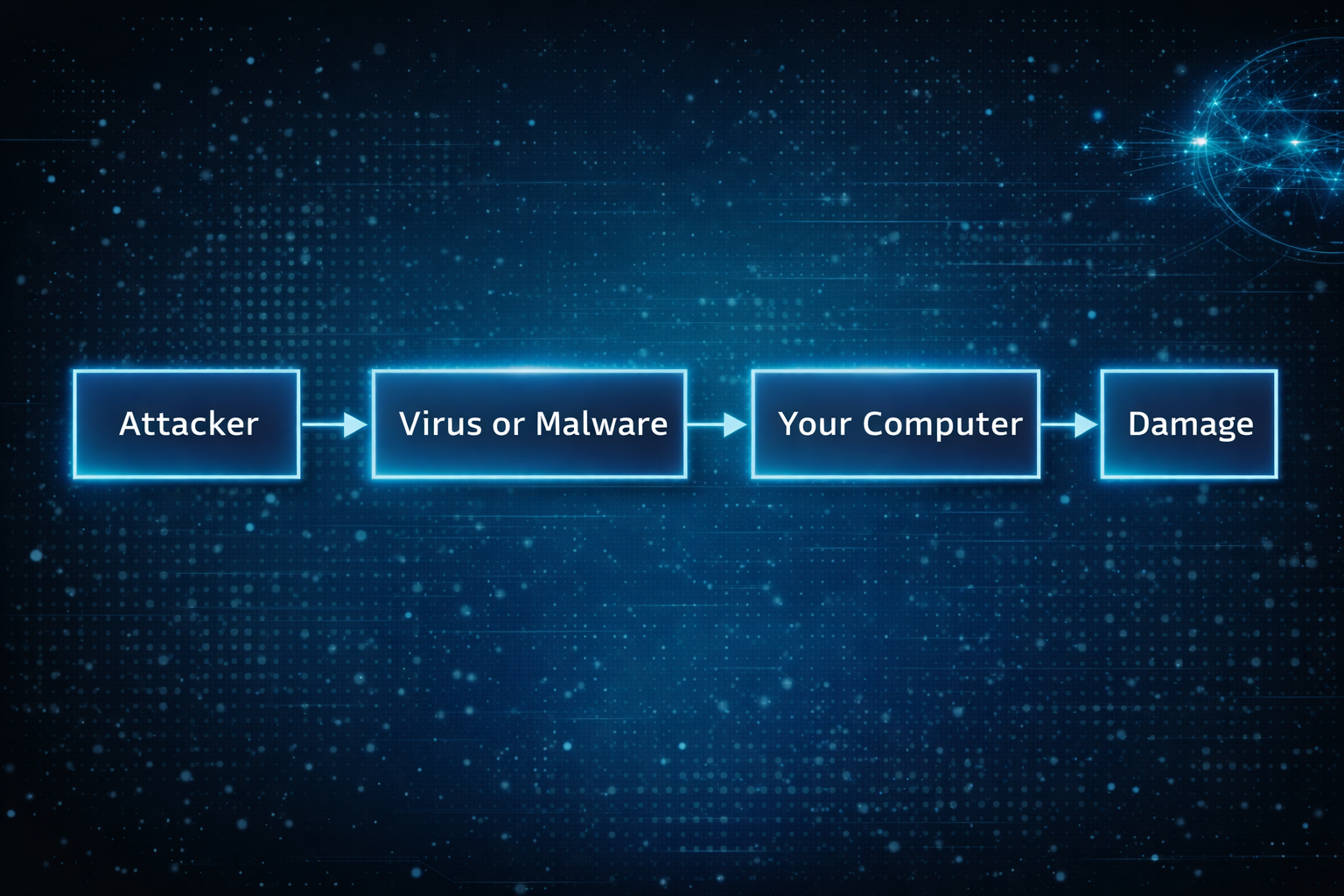\n\nThat model made sense when systems were fragile and defenses were thin. If you avoided sketchy downloads, you were mostly safe.\n\nThat world quietly disappeared.\n\n## What compromise usually looks like now\n\nToday, the computer is often fine. The operating system is doing its job. Nothing looks obviously broken.\n\nWhat fails is access.\n\n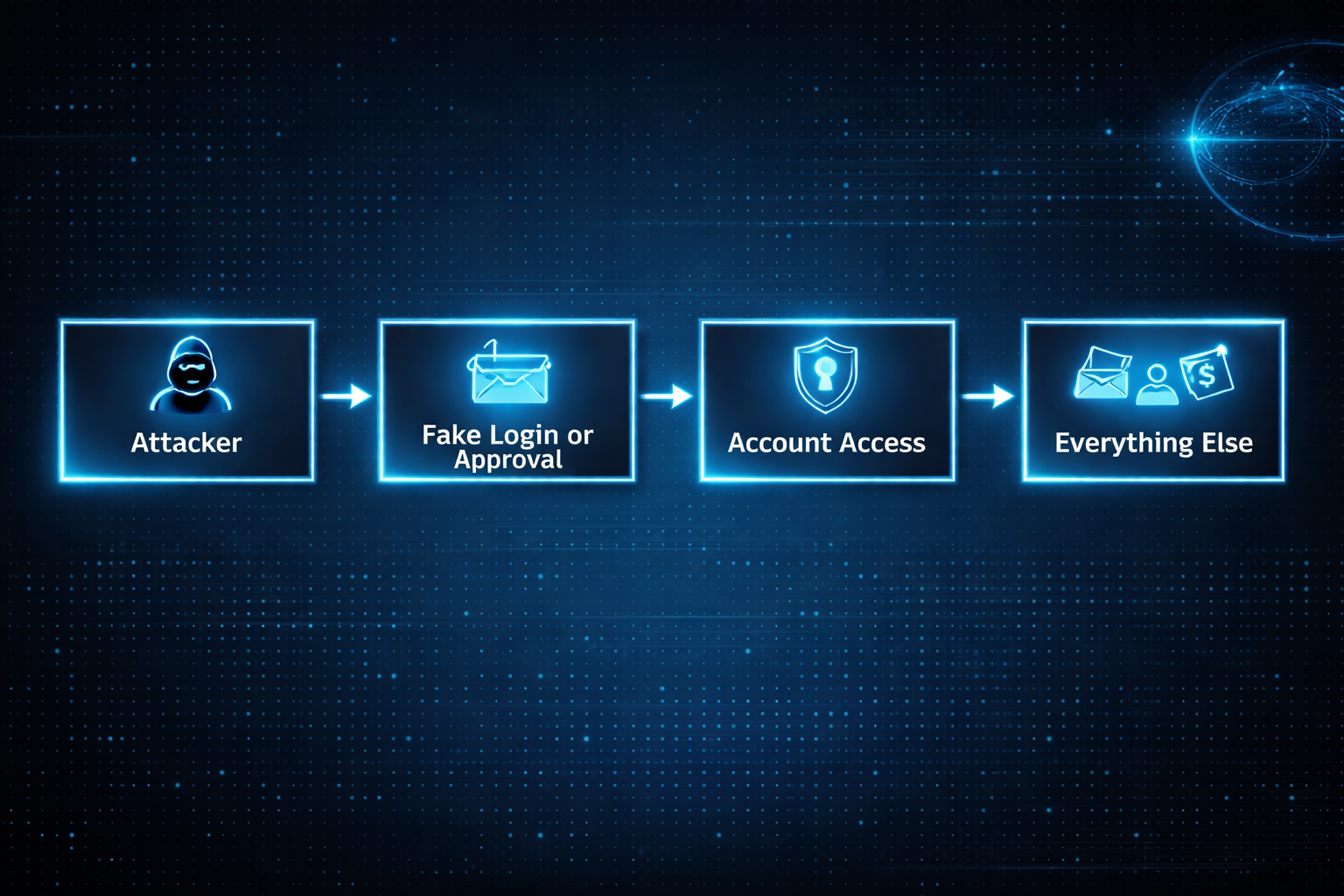\n\nOnce someone controls an account, they rarely need to touch the device. Email access alone is enough to reset passwords, read private documents, send convincing messages, and stay invisible for a long time.\n\nThis works the same way on Windows, macOS, and iOS. The platform matters far less than people think once trust is lost.\n\n## Why browsers quietly became the real operating system\n\nMost of what matters now happens inside a browser. Email, documents, calendars, dashboards, payments, internal tools. That is where work lives and where trust accumulates.\n\nModern attacks aim for that session, not the computer underneath it.\n\nA fake login page that looks familiar. A browser extension that seemed useful at the time. A stolen session token that never triggers a password prompt.\n\nOnce the browser believes you are authenticated, the rest of the system follows along.\n\n## What this feels like as an end user\n\nFor most people, compromise does not feel technical. It feels confusing.\n\nYou cannot log into an account you used yesterday. You see password reset emails you did not request. Calendar events appear that you never added. Messages are sent from your account that you did not write. A bank asks you to confirm activity you do not recognize.\n\nNothing screams virus. It just feels like control slipping.\n\nThat uncertainty is often the worst part. You stop trusting your own systems. You hesitate on legitimate prompts because everything suddenly looks suspicious.\n\nI learned this the hard way. In the early 2000s, I used to think the worst that could happen was someone looking at my emails. Then that account got hacked and the attackers deleted everything. I lost all that data, but I was lucky in a strange way. They could have used all those passwords and bank details I kept emailing myself to access my accounts. The data loss was bad, but account takeover would have been catastrophic.\n\nWhat I didn't realize then is that the real threat isn't what attackers can see. It's what they can become. An email account is basically a gateway to everything else you own online. Once they're in there, they can reset passwords, drain bank accounts, impersonate you across every service. The deletion was painful, but a complete account takeover would have destroyed me.\n\n## Why this keeps cascading once it starts\n\nOnce one core account is compromised, others tend to follow quickly.\n\nBy the time most people realize something is wrong, multiple accounts are already involved. Cleaning it up becomes time consuming, stressful, and disruptive.\n\nThe damage is not always financial. Lost files, missed messages, and impersonation have real personal and professional consequences even when no money is stolen.\n\n## The attack vectors people rarely think about\n\nMany real compromises come from places that feel routine.\n\nCalendar invites carry links and reminders that feel trusted. People accept them reflexively.\n\nOAuth and sign-in flows feel safer than passwords, so people approve access quickly. That access often survives password changes because it was never tied to the password in the first place.\n\nBrowser extensions accumulate quietly. They update silently. Permissions stay broad. One compromised extension can observe sessions and modify pages without ever looking like malware.\n\nRecovery paths are often forgotten entirely. Backup email addresses, trusted devices, linked accounts. Attackers do not need to break the front door if the side door is unlocked.\n\nShared devices create long-lived access in environments that no longer exist. Trust lingers long after context changes.\n\nNone of this feels malicious in the moment. That is why it works.\n\n## Where AI makes this harder for normal people\n\nAI did not invent new attacks. It removed friction.\n\nMessages are now fluent, contextual, and emotionally tuned. What used to stand out blends into everyday communication. Small mistakes become easier to make, not because people are careless, but because the signal is harder to distinguish from normal life.\n\nAI also enables adaptive interaction. Instead of a single scam message, attacks can unfold as conversations that respond naturally to hesitation or questions.\n\nAt the same time, AI tools are becoming part of daily workflows. People paste sensitive information into them without much thought. They authorize access to be helpful or efficient. Each approval feels minor. Collectively, they widen the attack surface in ways most users never map explicitly.\n\n## Why platform choice alone no longer protects you\n\nThere is a comforting belief that choosing the right operating system solves most of this. Better defaults help, but they do not solve the core issue.\n\nIdentity flows across devices. Once access is compromised, it follows you everywhere.\n\nThis is why people feel blindsided after doing everything right. Updates were installed. Sketchy downloads were avoided. None of that mattered once trust was reused upstream.\n\n## Work accounts versus personal accounts\n\nYour work email operates under different rules.\n\nYour employer controls your work account. They can see what you're doing, enforce password changes, require two-factor authentication, and reset your access if needed. Your IT department will notice if someone is using it from a strange location or accessing unusual data. But you have less control over recovery if something goes wrong.\n\nWork account compromise is worse in different ways. An attacker gains access to your company's data, your coworkers, and potentially customer information. The problem spreads beyond you.\n\nPersonal accounts are yours to protect or neglect. No one is watching. You control recovery, but you're also alone in defending it.\n\nProtect your work account like it matters to everyone else, because it does. Use the strongest authentication your employer allows. Don't reuse that password anywhere. Assume it's being monitored. If you suspect it's compromised, tell IT immediately.\n\nYour personal accounts matter more to you than anyone else will ever know. That responsibility is entirely yours.\n\n## So where does antivirus fit now\n\nAntivirus still has a place. It helps catch known malicious software and obvious bad installers, especially on Windows.\n\nIt just is not what usually saves people anymore.\n\nMost modern compromises do not involve infecting the machine at all. They involve inheriting access. Antivirus cannot stop you from logging into the wrong place or approving the wrong thing.\n\nIt is a seatbelt, not the steering wheel.\n\n## Understanding data breaches\n\nWhen you hear that a service you use suffered a data breach, it's worth understanding what that actually means.\n\nA breach means attackers got data that shouldn't be public. If it's a password, that password is now known. If it's your email and password together, that combination is in a list somewhere that gets shared and tested against other services.\n\nCheck if you're in a known breach at [Have I Been Pwned](haveibeenpwned.com). Enter your email and you'll see which services leaked your information. This is useful. Not panic-inducing. Just useful.\n\nA breach is past tense. Your password was leaked in 2018. That doesn't mean someone is using it now. But if you reused that password on other sites, those accounts are exposed.\n\nThis is why password reuse is so dangerous. One old breach at some forgotten service becomes a key to your email, banking, or work accounts years later.\n\nThe action is simple. If you were in a breach for a service that knows your password, change it. If you used the same password elsewhere, change those too. If the breached service offered two-factor authentication and you didn't use it, enable it now.\n\nMost people are in multiple breaches. You probably are too. That's normal. The breach that matters is the one you don't know about yet. The one where you kept the same password everywhere.\n\n## Spotting compromise before it spirals\n\nThere are early signals before the damage becomes obvious.\n\nCheck your account activity periodically. Most email and cloud services show where you're signed in and recent login locations. An unfamiliar city or device in that list is a genuine warning sign.\n\nRecovery email or phone number changes are a red flag. If you suddenly can't use your backup email to reset a password, someone may have changed it. Same with linked phone numbers or authentication apps.\n\nConnected apps and permissions creep slowly. Services like Google and Microsoft show what third-party apps have access to your account. If you see apps you don't recognize, or apps with permissions you don't remember granting, revoke the access. It's usually one click.\n\nTwo-factor authentication breaks the account takeover chain. If someone has your password but not your phone, they still can't get in. That friction is what stops most attacks.\n\n## Behaviors that expose you more than others realize\n\nReusing passwords across sites means one breach ripples everywhere. A breach at some obscure service leaks credentials that work on Gmail or your bank. Password managers let you use different passwords everywhere without memorizing them.\n\nApproving account access without reading what's being requested is risky. That app asking for \"calendar and email access\" might only need one of those. Read the request before clicking approve.\n\nPublic WiFi creates a different problem than it used to. The WiFi itself isn't the issue. The issue is attackers intercepting login traffic. VPNs help, but real protection comes from password managers autofilling credentials and services using encryption. Don't manually type passwords on public WiFi.\n\nClicking links in emails, even from people you know, is riskier now. Those emails can be impersonated or accounts can be compromised. If something seems unusual, go directly to the website instead of clicking the link. Especially with financial and account management emails.\n\n## Anti-patterns: What NOT to do\n\nSome habits feel convenient but directly enable compromise.\n\nDo not share passwords with family members, even in emergencies. Once shared, you lose control. You can't change it without inconveniencing them. If they're compromised, so are you. If they leave or your relationship changes, you have a password you never reset. Use family plans or shared password vaults instead.\n\nDo not write passwords down and leave them accessible. A notebook on your desk, a sticky note in your wallet, or a note in your phone is worse than a password manager. No encryption. No backup. No way to update everywhere at once.\n\nDo not use the same password or PIN pattern across accounts. This is the core vulnerability that breaks everything. One breach becomes an attack on all your accounts.\n\nDo not disable security notifications or two-factor authentication because they're inconvenient. They're inconvenient by design. That inconvenience is what stops attackers.\n\nDo not ignore unusual activity emails from your accounts. Check them. If they're real, you need to know. If they're phishing, at least you're awake and can respond.\n\nDo not grant app permissions you don't understand. That app asking for \"calendar and email access\" can now see every conversation you've had and every meeting you're attending. Read what's being requested. It should match what the app does.\n\nDo not type passwords on public WiFi. The WiFi isn't the vulnerability. The vulnerability is someone intercepting your login. Use a password manager so it autofills, or wait until you're home.\n\nDo not leave old accounts open and forgotten. An old email you don't use, an old social media account, a service you abandoned. These become recovery paths for attackers. Delete them or change their passwords if deletion isn't possible.\n\n## For families and less technical users\n\nShared accounts with family are riskier than they seem. A shared Netflix account is fine. A shared email or cloud account is a serious risk because anyone with access can reset other accounts.\n\nChildren's accounts should be separate, even if they're young. An account a 10-year-old uses for school shouldn't be shared with the whole family.\n\nElderly or less tech-savvy family members are often targeted specifically. Attackers know they're less likely to recognize phishing or social engineering. If a parent or grandparent is asking you to help verify their account, double-check the request actually came from that service.\n\nSupport channels become attack vectors when attackers impersonate them. A call claiming to be from your bank asking you to verify information should be treated as suspicious. Legitimate support never asks for passwords.\n\n## Mobile-specific reality\n\nThe line between apps and accounts is blurrier on mobile. An app installed from your app store has permissions to see your location, contacts, photos, calendar, and more. If the app is compromised, that's a live connection to your personal information.\n\nSign-in-with-Google or sign-in-with-Apple defaults are convenient but they also mean that Google or Apple now has another connection tracking what you're doing. More importantly, if someone compromises your account, they get access to every app you've signed into that way.\n\nAndroid and iOS protect you in different ways, but both flow personal data through your account. The account is still the single point of failure.\n\n## What actually helps\n\nThe defenses that matter now are different from what most people expect.\n\nTwo-factor authentication is the most effective thing you can do. It breaks the account takeover chain. Even if someone has your password, they still can't get in without your phone or authentication app. Use it on email, cloud storage, and banking. Those are the accounts that unlock everything else.\n\nA password manager changes the math entirely. Chrome and Apple Keychain both work well. They generate random passwords automatically, so you never have to come up with one yourself. More importantly, they make it trivial to use different passwords everywhere. One breach stops being a key to all your accounts.\n\nPeriodically check what apps have connected to your accounts. Google and Microsoft both show you this. Revoke anything you don't recognize or don't remember approving. That access often survives password changes because it was never tied to your password in the first place.\n\nWatch for unusual activity. Most services show you where you're signed in and recent login locations. An unfamiliar city or device is a genuine warning sign. Pay attention to password reset emails you didn't request. Those are often the first signal something is wrong.\n\nSet up backup authentication methods and store them safely. Recovery email, phone number, recovery codes. You need these if you get locked out, but they're also attack vectors if someone else controls them. Keep them secure, but don't forget where you put them.\n\nWhat doesn't help as much anymore? Antivirus software, avoiding downloads, keeping a clean system. Those still help, but they don't solve the modern problem. The attack surface moved, and so should your defenses.\n\n## How to actually implement this\n\nThe biggest gap between understanding the problem and staying safe is actually doing something about it.\n\nDon't reuse passwords. Use the password manager built into your browser or phone. You already have it.\n\nIf you use Chrome or Android, use the password manager that comes with it. If you use Apple devices, use Keychain. Both work everywhere. Both are encrypted. Both sync across your devices. You don't need anything else.\n\nWhen you create a password on a website, let the password manager generate a random one. Don't come up with it yourself. Don't try to make it memorable. The whole point is that you never have to remember it or type it. The password manager fills it in.\n\nThe temptation is to reuse a password you already know because it feels simpler. It's not. It's the opposite. One breach leaks that password everywhere.\n\nWhat doesn't work? If you email yourself a password, it's unencrypted and accessible to anyone with your email. A desktop text file has no encryption and anyone with access to your computer can see it. A notebook on your desk is a physical security issue. It can be photographed or stolen. A spreadsheet of passwords is centralized and unencrypted, so if it's stolen, the damage ripples everywhere. A phone photo of a password note gets backed up to the cloud and becomes searchable.\n\nThese approaches are worse than reusing the same password because they're unencrypted and centralized. One breach or one moment of access exposes everything.\n\nUse the password manager. Let it generate random passwords. Use a different password for every site. Enable auto-fill so you never type passwords manually, especially on public WiFi. One breach stops being a key to all your accounts.\n\nFor critical documents, use a combination of physical and digital storage.\n\nKeep the originals in a physical safe or safe deposit box. Birth certificates, passports, property deeds, insurance policies, medical records, financial statements. Not on your desk. Not easily accessible. These are documents you rarely need, so the inconvenience of accessing them is worth the security.\n\nScan them or take photos and store the digital copies in cloud storage. Google Drive, Microsoft OneDrive, or iCloud all work. Enable two-factor authentication on that account. You get access from anywhere and automatic backup, but the encryption and authentication keep it protected.\n\nDon't keep important documents on your desktop or in random folders. Don't email them to yourself as attachments. Don't store them on a USB drive left in a drawer. Those feel convenient but they're not actually protected.\n\nFor recovery codes from two-factor authentication, print them out or write them down and store the physical copy in a safe place. A safe or safe deposit box. Not in a desk drawer. Not a photo on your phone. Not in unencrypted notes. You need these if you get locked out, but if someone else finds them, they become an attack vector.\n\nThe pattern is the same: don't rely on a single location. Don't sacrifice security for access. Use multiple layers, both physical and digital backup, so one failure doesn't lose everything.\n\n## If you realize you're compromised\n\nAct fast. The first 24 hours matter.\n\n**Step by step:**\n\n1. Use a clean, trusted device and go directly to the real website. Don't click links in emails or messages. Type the URL yourself or use a bookmark you know is safe.\n2. Change your email password immediately. Use a strong, unique password. Email unlocks everything else.\n3. Sign out of all sessions. Most email and cloud services have an option to sign out everywhere at once. This invalidates any active sessions attackers might be using.\n4. Check for persistence. Look for email forwarding rules, filters, or delegates that you didn't set up. Attackers often leave these behind to maintain access even after you change your password.\n5. Review connected apps and devices. Check what devices are signed in and revoke any you don't recognize. Check what third-party apps have access to your account and revoke anything suspicious.\n6. Was your email compromised? If yes, change passwords on critical accounts immediately. Financial accounts, healthcare, government services, and your phone carrier. Assume any account with a similar password is at risk.\n7. Freeze your credit and set fraud alerts if financial accounts were involved. This stops attackers from opening new accounts in your name.\n8. Continue monitoring. Watch for unusual activity across all your accounts. Check account activity logs regularly for the next few weeks.\n\n## The real shift to internalize\n\nModern compromise is rarely about broken software. It is about normal behavior becoming predictable.\n\nLogging in. Approving access. Staying signed in. Reusing trust across contexts.\n\nThese are not technical actions. They are everyday habits. That is why they are so easy to exploit.\n\n## What really matters\n\nIf modern compromise feels unfair, it is because the rules changed quietly.\n\nYour computer did not suddenly become unsafe. The way trust moves through your digital life did.\n\nOnce you start thinking in terms of identity, sessions, and approvals, these incidents stop feeling mysterious. They start feeling structural.\n\nNot because systems are weak, but because trust is easier to steal than code is to break.",
"date_published": "2026-01-26T10:00:00.000Z",
"authors": [
{
"name": "Nick Karnik",
"url": "https://nick.karnik.io"
}
],
"tags": [
"Cybersecurity",
"Attack Surface"
],
"image": "https://nick.karnik.io/assets/images/blog/modern-attack-surface/the-modern-attack-surface-cover.png",
"_attribution": {
"copyright": "© 2026 Nick Karnik. All rights reserved.",
"cite_as": "Nick Karnik, \"The Modern Attack Surface: How Computers Get Compromised\", nick.karnik.io (2026). https://nick.karnik.io/blog/the-modern-attack-surface-how-computers-get-compromised",
"canonical": "https://nick.karnik.io/blog/the-modern-attack-surface-how-computers-get-compromised"
}
},
{
"id": "https://nick.karnik.io/blog/how-rag-works",
"url": "https://nick.karnik.io/blog/how-rag-works",
"title": "A Practical Way to Think About RAG",
"summary": "A grounded mental model for Retrieval-Augmented Generation, with two concrete examples and the tradeoffs that actually matter.",
"content_text": "Retrieval-Augmented Generation (RAG) shows up constantly in conversations about LLM applications, especially once private or fast-changing data enters the picture. What I kept noticing was a gap between two kinds of explanations. Some stayed so abstract that it was hard to tell when RAG actually helped. Others jumped straight into tools and pipelines without first explaining what problem the system was really solving.\n\nThis is the mental model I keep coming back to when evaluating RAG systems. It is not exhaustive, but it is enough to make informed design decisions and to recognize when RAG is likely to help and when it is likely to cause problems.\n\n## Why RAG exists\n\nLanguage models are strong at reasoning over text, but they operate inside a fixed knowledge boundary. They do not know your internal documents, policies, or product details unless those are explicitly provided at inference time. They also do not update themselves as your information changes.\n\nWhen a question depends on knowledge outside the model’s training data, the model has no mechanism to retrieve it on its own. Without help, it fills in gaps using general patterns, which is often where hallucinations start.\n\nRAG exists to address this limitation. It gives the model access to relevant external information at the moment it generates an answer, without retraining or fine-tuning the model itself.\n\nThat distinction matters. RAG does not make the model smarter. It makes the system more grounded.\n\n## A useful way to think about it\n\nThe simplest way to think about RAG is as a separation of responsibilities.\n\nThe model is responsible for reasoning, synthesis, and language. The system around it is responsible for deciding what information the model should see.\n\nIf you ask a question that depends on internal context, the quality of the answer depends almost entirely on whether the right reference material was placed in front of the model first. RAG is the mechanism that performs that selection.\n\nOnce you frame it this way, most debates about RAG become debates about retrieval quality rather than model behavior. It explains why systems can feel unreliable even when the model is doing its job.\n\n## The basic flow, with emphasis on what matters\n\nMost RAG systems follow the same general pattern, but not all parts are equally important.\n\nDocuments are first split into chunks. These should be large enough to preserve meaning but small enough to be retrieved selectively. Chunking is one of the most underestimated parts of RAG, and it is where many systems quietly go wrong.\n\nIn practice, chunk boundaries often need to respect document structure, such as sections or paragraphs, rather than arbitrary token counts. Some overlap between chunks is also common, not to improve recall in theory, but to avoid cutting important context in half.\n\nEach chunk is then converted into an embedding that represents its semantic meaning. When a user asks a question, the question is embedded as well, and the system retrieves the chunks that appear closest in meaning.\n\nEmbedding quality matters, but it rarely compensates for poor chunking or unclear queries. Most retrieval failures show up well before vector similarity becomes the limiting factor.\n\nThose retrieved chunks are added to the prompt along with the user’s question. The model then generates a response based on that supplied context.\n\nThe loop itself is simple. The difficulty comes from making each step reliable under real data.\n\n## A concrete example that usually works\n\nImagine an internal policy document that covers refunds, eligibility criteria, timelines, and edge cases. A user asks, “Can customers get a refund after 30 days?”\n\nWith RAG, the retrieval step might surface three chunks: one defining eligibility, one describing standard timelines, and one listing exceptions. The model answers using those specific sections instead of relying on general knowledge about refunds.\n\nIf the answer is correct, it is because retrieval surfaced the right material. If it is wrong, the problem is almost always that an important chunk was missed or that irrelevant context crowded out the relevant one.\n\nThis pattern repeats across use cases.\n\n## A second example, where RAG often fails\n\nA common failure case shows up in troubleshooting or operational knowledge bases.\n\nSuppose you have a long document describing how to debug a production issue, including prerequisites, conditional steps, and warnings. A user asks a targeted question like, “Why does service X fail only after a config reload?”\n\nRetrieval may return chunks that mention service X and config reloads, but miss a critical section explaining an ordering constraint or a hidden dependency. The model produces an answer that sounds reasonable, cites the retrieved context, and is still wrong in a way that is hard to detect.\n\nThis kind of failure is subtle. The system appears to work. The answer is coherent. But an important constraint was never retrieved, so the model could not reason about it.\n\nThis is one of the reasons RAG systems can feel unreliable in operational settings. They fail quietly when retrieval misses the one piece that actually matters.\n\n## What RAG does well, and what it does not\n\nRAG works best when the task involves synthesizing information from a body of text that already contains the answer. It is well suited for policy questions, documentation lookup, and knowledge-based summarization.\n\nIt is much less effective when correctness depends on precise values, strict ordering, or full coverage of edge cases. In those situations, missing context is not a minor issue. It invalidates the answer.\n\nThis is also why prompt tuning rarely fixes weak RAG systems. If retrieval is off, prompting only rearranges the same incomplete inputs.\n\n## When RAG is the wrong choice\n\nRAG is often treated as a default architecture, but in many cases it introduces more complexity than it removes.\n\nIf your dataset is small and stable, fine-tuning or even simple in-prompt examples may be more reliable. If the task requires deterministic outputs, structured extraction, or exact correctness, a rules-based or programmatic approach is usually safer.\n\nRAG shines when the problem is about informed synthesis, not enforcement or computation.\n\n## A simple way to visualize the system\n\nHere is the basic flow. Most complexity in real systems is layered on top of this, not a replacement for it.\n\n \n\n### What each step does:\n\n**User question**\n\nSomeone asks something like \"Can customers get a refund after 30 days?\" This triggers the RAG pipeline. The system needs to find relevant information to answer this specific question.\n\n**Embed the question**\n\nThe question gets converted into a vector embedding that captures its semantic meaning. This is not about matching keywords. It is about what the question actually means. \"Refund policy for late requests\" and \"Can I get my money back after a month?\" would produce similar embeddings even though the words are different.\n\n**Retrieve relevant chunks**\n\nThe system compares the question's embedding against all the chunks in your document store and finds the ones that are semantically closest. These are the chunks most likely to contain relevant information. This usually returns somewhere between 3 and 10 chunks.\n\n**Add chunks to the prompt**\n\nThe retrieved chunks get inserted into the prompt along with the original question. Instead of just asking \"Can customers get a refund after 30 days?\", the system is now asking \"Given these policy sections: [chunk 1, chunk 2, chunk 3], can customers get a refund after 30 days?\"\n\n**Generate a response**\n\nThe model reads the question and the context chunks, then generates an answer. It does the same reasoning it always does, but now it has the specific information it needs. The quality of this answer depends almost entirely on whether retrieval found the right chunks.\n\n## Closing\n\nKeeping this flow in mind helps keep systems understandable, even as more advanced techniques are layered on top.\n\nRAG is best understood as a pattern, not a product or a feature. It is a way to control what information a language model sees at the moment it produces an answer.\n\nMany modern systems layer additional techniques on top of this pattern, such as hybrid retrieval, reranking, or multi-step queries. These can improve results, but they do not change the underlying shape of the system. Retrieval still determines what the model can reason about. Generation determines how that reasoning is expressed.\n\nAs a starting point, this mental model is enough to decide whether RAG belongs in a system and where the real risks are. Once that’s clear, deeper implementation choices become easier to make and easier to question.",
"date_published": "2025-12-12T10:00:00.000Z",
"authors": [
{
"name": "Nick Karnik",
"url": "https://nick.karnik.io"
}
],
"tags": [
"RAG",
"LLM"
],
"image": "https://nick.karnik.io/assets/images/blog/how-rag-works-cover.png",
"_attribution": {
"copyright": "© 2025 Nick Karnik. All rights reserved.",
"cite_as": "Nick Karnik, \"A Practical Way to Think About RAG\", nick.karnik.io (2025). https://nick.karnik.io/blog/how-rag-works",
"canonical": "https://nick.karnik.io/blog/how-rag-works"
}
},
{
"id": "https://nick.karnik.io/blog/build-for-speed",
"url": "https://nick.karnik.io/blog/build-for-speed",
"title": "How to Build for Speed: What It Actually Takes to Release Fast",
"summary": "Everyone wants to move fast, but not everyone knows how. Speed isn’t about heroics or skipping QA. It’s about trust in your systems, your telemetry, and your ability to roll back safely. Lessons from years of shipping at Microsoft, Google, Salesforce, Tableau, and startups on what it actually takes to release fast.",
"content_text": "Everyone wants to move fast, but not everyone knows how. It sounds simple: automate more, release often, catch problems earlier. But in practice, it’s complicated. Speed is fragile. It depends on hundreds of small things working together such as your CI, your tests, your telemetry, your rollback path, and how much trust your team has in all of it.\n\nOver the years I’ve worked on large systems at Microsoft, Google, Salesforce, Tableau, and T-Mobile, and on smaller teams where everything was built from scratch. Earlier, at the Institute for Disease Modeling, we ran large-scale epidemiological simulations on HPC clusters, basically supercomputers, before moving workloads to the cloud. Whether it was data pipelines, developer platforms, or consumer products, the challenge was always the same: how do you move fast without breaking everything?\n\nReleasing fast isn’t about typing faster or skipping QA. It’s about shortening the distance between writing a line of code and knowing it’s safe in production. It’s about how quickly you can detect a problem, roll back, and try again. The best teams aren’t fearless. They’re steady because they’ve built systems that make it safe to move.\n\nAt Microsoft, when we shipped new features for Bing, we started with 0.3 percent of traffic. That sounds tiny, but at that scale it was plenty with millions of queries a day, enough to see real signal without risking the system. At Google, on Gemini’s developer tools, we sometimes began closer to ten percent. The numbers weren’t sacred; they were dictated by confidence. Some launches went from 0.3 to 100 percent in a single day. Others crept from 0.3 to 25 to 100 over a few weeks. The pace wasn’t set by process; it was set by how long it took for telemetry to appear on dashboards and for us to trust what we saw. At that size, data can take a day or two to roll in. You move at the speed of truth.\n\nStartups don’t have that problem. They see what happens right away - a spike in errors, a message from a user, or a Slack alert. That closeness is their advantage. When feedback is instant, you don’t need ceremony. You just fix it.\n\nSpeed isn’t something a CI system gives you. It’s something you build around it. You can use GitHub Actions, Buildkite, Jenkins, whatever you want. The tool doesn’t matter as much as having a workflow that actually works for your team. What matters is that you can trust the system, that it runs the right checks, and that you can reproduce most of it locally before you even push a commit. Docker helps with that. If your local setup behaves like your CI environment, you save yourself an entire cycle of guesswork.\n\nBack when I worked on MSN, our build used to take twenty-four hours. A single bad check-in could cost everyone a full day. That’s why \"don’t break the build\" was almost a religion. Some teams would even make you wear a funny hat or post your name on a board if you did. It sounds childish, but the idea made sense: when one person slows the whole team, everyone feels it. The wall of shame wasn’t the point. The point was that catching issues early helps everyone move faster.\n\nA good release isn’t one that looks fancy on a dashboard. It’s one that happens quietly, automatically, without anyone hovering over it. You write code, you test it locally, you push it, and the system takes it from there. It runs lint, type checks, and deeper tests you can’t afford to run locally, and if everything’s green, it ships. You shouldn’t need a meeting for that.\n\nMost of the pain in releasing fast comes from bad tests and slow pipelines. I’ve seen test suites hang for hours, flaky tests that waste days, and dependencies between teams where your build breaks because someone else’s tests fail. Whether it’s culture, tooling, or just a black-box pipeline, the result is the same: time lost and trust eroded. Logging and telemetry matter as much for your build system as they do for production. You need to see how long each stage takes, where the bottlenecks are, and which tests are dragging you down. There’s usually an easy win hiding there. Not everything can be shortened, but you can parallelize, split workloads across containers, or move slow integration tests to a nightly run. Any test that takes more than a few seconds is worth questioning.\n\nTests that run in watch mode or trigger on file changes are a huge help. When type checks or lint errors show up while you’re still coding, you fix them immediately instead of waiting for CI to fail later. That’s the idea behind \"shift left.\" If you picture the entire software process as a line, code on the left, production on the right, then shift left just means catching problems earlier in that line. The further right an issue gets, the more expensive it becomes to fix. Finding something during coding or pre-commit takes seconds. Finding it after deployment can take hours, with more people involved. The goal is to push every form of feedback as far left as possible, where it’s still cheap and fast to act on it.\n\nSpeed isn’t just how fast you can push code; it’s how quickly you can know if something went wrong. Every release should tell you what happened, not make you guess. After a deploy, you check staging first. There should be zero errors, all tests passing, and no unexplained warnings. If there’s a warning, it should already be tied to a bug so whoever looks at it knows it’s known and being worked on. That kind of traceability matters when hundreds of people are touching the same system.\n\nYou also watch the basics: latency, crash rates, availability are the things that actually matter to users. For search results, we targeted under 300 milliseconds end-to-end. Each downstream dependency had its own smaller budget: 100 ms here, 200 ms there. In a distributed system it’s like a train passing through stations. Each service has a small window to respond. If it misses that window, you move on, unless it’s critical. At Bing, for example, search results had to arrive, but ads or side answers could be skipped if they were late. It kept the system responsive without blocking on slower dependencies.\n\nYou need alerts wired into all of this: Slack, email, text, pager, whatever your setup is. The best systems tell you before the user does.\n\nGood dashboards are underrated. Bad ones slow you down because you can’t tell what broke. Great ones let you glance, see the problem, and move on. The goal is to automate as much of that feedback as possible so humans aren’t the bottleneck. When your deploys can move from check-in to staging to production automatically, with telemetry watching the path the whole way, that’s when shipping becomes easy.\n\nHaving a solid rollback mechanism is just as important as releasing. You can’t move fast if recovery is slow. Blue-green deployments, feature flags, and one-click rollbacks make mistakes survivable. The faster you can undo something, the braver you can be about shipping again. Every system should have a clear escape hatch. Rollback shouldn’t require a war room.\n\nReleasing fast isn’t just a technical problem; it’s a hygiene problem. Every flag, every flaky test, every commented-out block of code adds friction. At Google we deleted old feature flags about two weeks after a release. Flaky tests were tracked, tagged, and fixed after three failures. Each one got a bug filed automatically, and on-call engineers were expected to watch them. At smaller startups I’ve kept the same principle even if the tooling was lighter: fix or delete, but don’t ignore. Every ignored failure is debt with interest.\n\nThere’s a misconception that moving fast means writing sloppy code. It’s the opposite. The only way to move fast for long is to have good habits. You can hack your way to a few quick releases, but you can’t sustain it without discipline. Clean code, reliable tests, clear ownership is what speed is built on.\n\nWhen a team really learns to release fast, it doesn’t feel like speed anymore. It feels calm. No adrenaline, no late-night deploy drama, no heroics. You merge, the pipeline runs, the telemetry lights up, and you go back to work. The system takes care of you because you’ve taken care of it. That’s the quiet truth about shipping fast. It’s not about risk or bravado. It’s about trust, in your process, in your code, and in each other.",
"date_published": "2025-10-23T13:47:00.000Z",
"authors": [
{
"name": "Nick Karnik",
"url": "https://nick.karnik.io"
}
],
"tags": [
"CI/CD",
"DevOps",
"Release Velocity"
],
"image": "https://nick.karnik.io/assets/images/blog/build-for-speed-cover.png",
"_attribution": {
"copyright": "© 2025 Nick Karnik. All rights reserved.",
"cite_as": "Nick Karnik, \"How to Build for Speed: What It Actually Takes to Release Fast\", nick.karnik.io (2025). https://nick.karnik.io/blog/build-for-speed",
"canonical": "https://nick.karnik.io/blog/build-for-speed"
}
},
{
"id": "https://nick.karnik.io/blog/its-not-the-launch-its-the-landing",
"url": "https://nick.karnik.io/blog/its-not-the-launch-its-the-landing",
"title": "It's Not the Launch, It's the Landing",
"summary": "In technology we celebrate launches as if they were victories. The moment something goes live there is a demo, a blog post, a slide in a performance review. It feels like success. But a launch is not the finish line. It is only takeoff. The real test is whether the product lands.",
"content_text": "In technology we celebrate launches as if they were victories. The moment something goes live there is a demo, a blog post, a slide in a performance review. It feels like success. But a launch is not the finish line. It is only takeoff. The real test is whether the product lands.\n\nNobody remembers Apollo 11 as a triumph simply because the rocket cleared the pad. It was a triumph because the astronauts landed on the moon, achieved their mission, and returned home safely.\n\nI saw this firsthand years ago at a security company. I built a feature that seemed minor at the time, a real-time status light that showed whether devices were online, idle, restarting, or updating. It worked across card readers, cameras, motion sensors, and alarms. There was no launch event, no fanfare. I wrote it in a couple of long nights because I believed it would help. And it did.\n\nSupport tickets dropped because technicians could see problems at a glance instead of digging through logs. Installations went faster because issues were obvious as soon as devices came online. If something went offline during setup you knew right away. Sales used it in demos. Customers could see right away it worked and they felt we were listening. Over time we expanded it so you could right click to control devices, group them, and take actions directly from the same interface. What began as a side project quietly transformed the product. That was a landing.\n\nPlenty of products we all use tell the same story. [Gmail](https://workspace.google.com/blog/productivity-collaboration/celebrating-50-years-of-email) began as a quiet invite-only service. The landing was steady adoption until it became the default for billions. GitHub was not splashy either, but pull requests became the way modern software is written. Dropbox began with a short [demo video](https://www.youtube.com/watch?v=7QmCUDHpNzE) on Hacker News, and the landing came when sync worked flawlessly and spread by word of mouth. None of these succeeded because of the noise at launch. They succeeded because they landed.\n\nWe have also seen the opposite. Google Glass had a dazzling demo. It failed not because it couldn't launch but because people didn't want to wear computers on their faces. Microsoft launched the Zune to compete with the iPod but it never landed because it lacked an ecosystem and cultural pull.\n\nSo how do you tell whether something has truly landed.\n\n**The landing test comes down to a handful of simple questions:**\n\n> Did adoption continue after the initial spike or flatten out? \n> Did retention improve after week two and week four or did users drop off? \n> Did the product hold up under real load or collapse when it mattered? \n> Did it replace an older workflow or did people drift back? \n> Did customers bring it up unprompted as valuable or did it fade away? \n> Did it achieve the goal it was built for?\n\nIf most of these questions can be answered with a clear yes, then you have a landing. If not, all you had was a launch.\n\nA launch with no landing isn't neutral. It's a liability. It adds complexity and noise for no gain.\n\nLaunches are important. They mark the moment when something becomes available. But they are not success. They are liftoff. Success is when the thing survives contact with reality, scales under pressure, and earns its place in people's lives.\n\nAnyone who has flown knows this truth. Takeoff is thrilling, but nobody claps when the plane leaves the ground. The relief and the gratitude come when the wheels touch down safely. In technology it is the same. Launches are exciting, but the real measure is whether the thing you built actually lands.\n\nLaunches are noise. Landings are history.",
"date_published": "2025-10-02T07:52:22.725Z",
"authors": [
{
"name": "Nick Karnik",
"url": "https://nick.karnik.io"
}
],
"tags": [
"Engineering",
"Startups"
],
"image": "https://nick.karnik.io/assets/images/blog/its-not-the-launch-its-the-landing-746ca19b-1bee-43ef-90bf-fd04bb1d5240.jpeg",
"_attribution": {
"copyright": "© 2025 Nick Karnik. All rights reserved.",
"cite_as": "Nick Karnik, \"It's Not the Launch, It's the Landing\", nick.karnik.io (2025). https://nick.karnik.io/blog/its-not-the-launch-its-the-landing",
"canonical": "https://nick.karnik.io/blog/its-not-the-launch-its-the-landing"
}
},
{
"id": "https://nick.karnik.io/blog/how-engineers-can-use-ai-effectively",
"url": "https://nick.karnik.io/blog/how-engineers-can-use-ai-effectively",
"title": "How Engineers Can Use AI Effectively",
"summary": "AI is everywhere in tech conversations. Some people hype it as magic while others dismiss it as overblown. The truth is simpler. AI is a tool. Like any tool in engineering, its value depends on how it is used. Used carelessly, it produces garbage. Used well, it creates leverage.",
"content_text": "AI is everywhere in tech conversations. Some people hype it as magic while others dismiss it as overblown. The truth is simpler. AI is a tool. Like any tool in engineering, its value depends on how it is used.\n\nUsed carelessly, it produces garbage. Used well, it creates leverage.\n\nI don't rely on AI to write my code for me. I use it to learn faster, refine ideas, and clear out repetitive work so I can focus on the decisions and systems that matter. When I am exploring a new library, I can ask for examples in context. When I hit a confusing error message, I paste it in and get possible root causes in seconds. When I am choosing between two approaches, I can compare tradeoffs without having to dig through endless blog posts or Stack Overflow threads.\n\nMost engineers stop at asking AI for snippets of code. That misses half the benefit. I use it as a critique partner. If I draft an API design, I will ask what edge cases I might be missing. If I sketch out an architecture, I will ask where it might break under load. If I put together a plan, I will ask it to challenge my assumptions. The answers are not always right, but even when they are off they push me to sharpen my own thinking and see blind spots earlier.\n\nInstead of fighting AI, we should be embracing it as a tool. Human progress has always followed this pattern. Every major leap came from adopting new inventions and finding ways to make them useful. Electricity transformed how we lived and worked. Automobiles and airplanes collapsed distances. Computers and the internet reshaped entire industries. In just the last 150 years we have advanced more than in the thousands of years before, precisely because we learned to harness these tools. AI is simply the next in that line. It is a turning point, and like every tool before it, it will get better the more we push it to meet our needs.\n\nA good example came up when I was reviewing a design that involved processing jobs from a queue where reliability mattered. The system needed retries, but it also had to avoid hammering a downstream API. I already knew about exponential backoff, but I wanted to see if there were edge cases I was missing.\n\nI asked AI to critique the design. It flagged that without jitter, simultaneous retries from many clients could create a thundering herd problem. It also suggested layering in a dead-letter queue for jobs that failed after multiple attempts. Neither idea was new to me, but having them surfaced in seconds let me validate my assumptions quickly and confirm the design before I moved ahead.\n\n**Initial design:**\n\n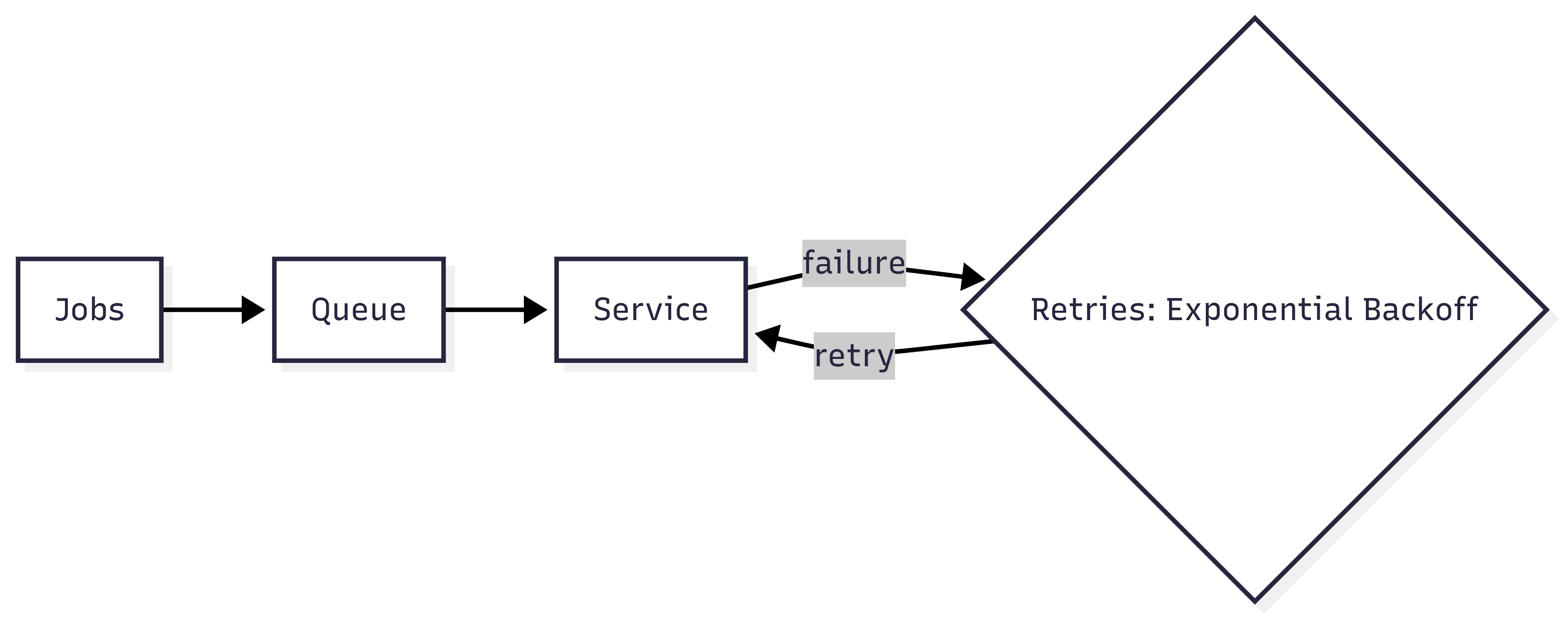\n\n_Jobs move into a queue and are retried with exponential backoff on failure._\n\n**AI-suggested improvements:**\n\n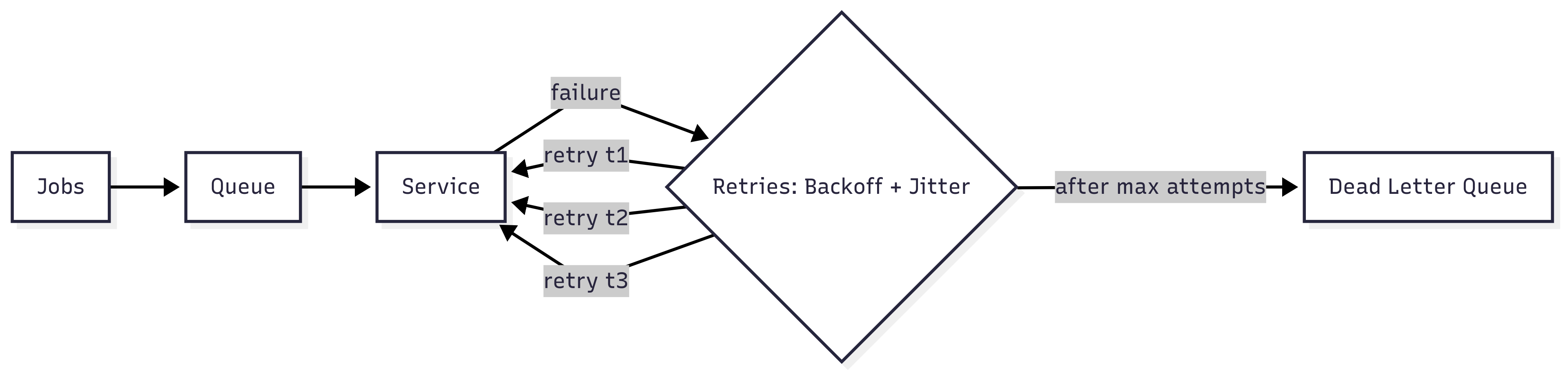\n\n_Adding jitter reduces retry storms. A dead-letter queue catches jobs that fail after maximum attempts._\n\nThese weren't concepts I didn't know, but AI gave me a quick critique partner Instead of spending half an hour sanity-checking edge cases, I got feedback in seconds and could move ahead with confidence.\n\nAI is also useful for clearing grunt work. Boilerplate code, simple tests, migration scripts, or even the first draft of a design document are all tasks it can handle quickly. What it cannot do is make judgment calls. If I don't understand what the model produced, I don't use it. That discipline makes the difference between outsourcing and acceleration.\n\nThere are also easy ways to get this wrong. If you paste AI-generated code into production without review, you will create problems later. If you use it as an excuse to stop learning, your skills will decay. If you rely on it to make critical design choices, you will end up with bloated and brittle systems nobody wants to own.\n\nAI will not replace engineers in the near future, but an engineer using AI will.",
"date_published": "2025-09-27T00:25:27.274Z",
"authors": [
{
"name": "Nick Karnik",
"url": "https://nick.karnik.io"
}
],
"tags": [
"Engineering",
"Productivity"
],
"image": "https://nick.karnik.io/assets/images/blog/how-engineers-can-use-ai-effectively-bc5411bc-f5fb-4a4f-aecf-62ae5358c42c.png",
"_attribution": {
"copyright": "© 2025 Nick Karnik. All rights reserved.",
"cite_as": "Nick Karnik, \"How Engineers Can Use AI Effectively\", nick.karnik.io (2025). https://nick.karnik.io/blog/how-engineers-can-use-ai-effectively",
"canonical": "https://nick.karnik.io/blog/how-engineers-can-use-ai-effectively"
}
}
]
}
\n\n### What each step does:\n\n**User question**\n\nSomeone asks something like \"Can customers get a refund after 30 days?\" This triggers the RAG pipeline. The system needs to find relevant information to answer this specific question.\n\n**Embed the question**\n\nThe question gets converted into a vector embedding that captures its semantic meaning. This is not about matching keywords. It is about what the question actually means. \"Refund policy for late requests\" and \"Can I get my money back after a month?\" would produce similar embeddings even though the words are different.\n\n**Retrieve relevant chunks**\n\nThe system compares the question's embedding against all the chunks in your document store and finds the ones that are semantically closest. These are the chunks most likely to contain relevant information. This usually returns somewhere between 3 and 10 chunks.\n\n**Add chunks to the prompt**\n\nThe retrieved chunks get inserted into the prompt along with the original question. Instead of just asking \"Can customers get a refund after 30 days?\", the system is now asking \"Given these policy sections: [chunk 1, chunk 2, chunk 3], can customers get a refund after 30 days?\"\n\n**Generate a response**\n\nThe model reads the question and the context chunks, then generates an answer. It does the same reasoning it always does, but now it has the specific information it needs. The quality of this answer depends almost entirely on whether retrieval found the right chunks.\n\n## Closing\n\nKeeping this flow in mind helps keep systems understandable, even as more advanced techniques are layered on top.\n\nRAG is best understood as a pattern, not a product or a feature. It is a way to control what information a language model sees at the moment it produces an answer.\n\nMany modern systems layer additional techniques on top of this pattern, such as hybrid retrieval, reranking, or multi-step queries. These can improve results, but they do not change the underlying shape of the system. Retrieval still determines what the model can reason about. Generation determines how that reasoning is expressed.\n\nAs a starting point, this mental model is enough to decide whether RAG belongs in a system and where the real risks are. Once that’s clear, deeper implementation choices become easier to make and easier to question.",
"date_published": "2025-12-12T10:00:00.000Z",
"authors": [
{
"name": "Nick Karnik",
"url": "https://nick.karnik.io"
}
],
"tags": [
"RAG",
"LLM"
],
"image": "https://nick.karnik.io/assets/images/blog/how-rag-works-cover.png",
"_attribution": {
"copyright": "© 2025 Nick Karnik. All rights reserved.",
"cite_as": "Nick Karnik, \"A Practical Way to Think About RAG\", nick.karnik.io (2025). https://nick.karnik.io/blog/how-rag-works",
"canonical": "https://nick.karnik.io/blog/how-rag-works"
}
},
{
"id": "https://nick.karnik.io/blog/build-for-speed",
"url": "https://nick.karnik.io/blog/build-for-speed",
"title": "How to Build for Speed: What It Actually Takes to Release Fast",
"summary": "Everyone wants to move fast, but not everyone knows how. Speed isn’t about heroics or skipping QA. It’s about trust in your systems, your telemetry, and your ability to roll back safely. Lessons from years of shipping at Microsoft, Google, Salesforce, Tableau, and startups on what it actually takes to release fast.",
"content_text": "Everyone wants to move fast, but not everyone knows how. It sounds simple: automate more, release often, catch problems earlier. But in practice, it’s complicated. Speed is fragile. It depends on hundreds of small things working together such as your CI, your tests, your telemetry, your rollback path, and how much trust your team has in all of it.\n\nOver the years I’ve worked on large systems at Microsoft, Google, Salesforce, Tableau, and T-Mobile, and on smaller teams where everything was built from scratch. Earlier, at the Institute for Disease Modeling, we ran large-scale epidemiological simulations on HPC clusters, basically supercomputers, before moving workloads to the cloud. Whether it was data pipelines, developer platforms, or consumer products, the challenge was always the same: how do you move fast without breaking everything?\n\nReleasing fast isn’t about typing faster or skipping QA. It’s about shortening the distance between writing a line of code and knowing it’s safe in production. It’s about how quickly you can detect a problem, roll back, and try again. The best teams aren’t fearless. They’re steady because they’ve built systems that make it safe to move.\n\nAt Microsoft, when we shipped new features for Bing, we started with 0.3 percent of traffic. That sounds tiny, but at that scale it was plenty with millions of queries a day, enough to see real signal without risking the system. At Google, on Gemini’s developer tools, we sometimes began closer to ten percent. The numbers weren’t sacred; they were dictated by confidence. Some launches went from 0.3 to 100 percent in a single day. Others crept from 0.3 to 25 to 100 over a few weeks. The pace wasn’t set by process; it was set by how long it took for telemetry to appear on dashboards and for us to trust what we saw. At that size, data can take a day or two to roll in. You move at the speed of truth.\n\nStartups don’t have that problem. They see what happens right away - a spike in errors, a message from a user, or a Slack alert. That closeness is their advantage. When feedback is instant, you don’t need ceremony. You just fix it.\n\nSpeed isn’t something a CI system gives you. It’s something you build around it. You can use GitHub Actions, Buildkite, Jenkins, whatever you want. The tool doesn’t matter as much as having a workflow that actually works for your team. What matters is that you can trust the system, that it runs the right checks, and that you can reproduce most of it locally before you even push a commit. Docker helps with that. If your local setup behaves like your CI environment, you save yourself an entire cycle of guesswork.\n\nBack when I worked on MSN, our build used to take twenty-four hours. A single bad check-in could cost everyone a full day. That’s why \"don’t break the build\" was almost a religion. Some teams would even make you wear a funny hat or post your name on a board if you did. It sounds childish, but the idea made sense: when one person slows the whole team, everyone feels it. The wall of shame wasn’t the point. The point was that catching issues early helps everyone move faster.\n\nA good release isn’t one that looks fancy on a dashboard. It’s one that happens quietly, automatically, without anyone hovering over it. You write code, you test it locally, you push it, and the system takes it from there. It runs lint, type checks, and deeper tests you can’t afford to run locally, and if everything’s green, it ships. You shouldn’t need a meeting for that.\n\nMost of the pain in releasing fast comes from bad tests and slow pipelines. I’ve seen test suites hang for hours, flaky tests that waste days, and dependencies between teams where your build breaks because someone else’s tests fail. Whether it’s culture, tooling, or just a black-box pipeline, the result is the same: time lost and trust eroded. Logging and telemetry matter as much for your build system as they do for production. You need to see how long each stage takes, where the bottlenecks are, and which tests are dragging you down. There’s usually an easy win hiding there. Not everything can be shortened, but you can parallelize, split workloads across containers, or move slow integration tests to a nightly run. Any test that takes more than a few seconds is worth questioning.\n\nTests that run in watch mode or trigger on file changes are a huge help. When type checks or lint errors show up while you’re still coding, you fix them immediately instead of waiting for CI to fail later. That’s the idea behind \"shift left.\" If you picture the entire software process as a line, code on the left, production on the right, then shift left just means catching problems earlier in that line. The further right an issue gets, the more expensive it becomes to fix. Finding something during coding or pre-commit takes seconds. Finding it after deployment can take hours, with more people involved. The goal is to push every form of feedback as far left as possible, where it’s still cheap and fast to act on it.\n\nSpeed isn’t just how fast you can push code; it’s how quickly you can know if something went wrong. Every release should tell you what happened, not make you guess. After a deploy, you check staging first. There should be zero errors, all tests passing, and no unexplained warnings. If there’s a warning, it should already be tied to a bug so whoever looks at it knows it’s known and being worked on. That kind of traceability matters when hundreds of people are touching the same system.\n\nYou also watch the basics: latency, crash rates, availability are the things that actually matter to users. For search results, we targeted under 300 milliseconds end-to-end. Each downstream dependency had its own smaller budget: 100 ms here, 200 ms there. In a distributed system it’s like a train passing through stations. Each service has a small window to respond. If it misses that window, you move on, unless it’s critical. At Bing, for example, search results had to arrive, but ads or side answers could be skipped if they were late. It kept the system responsive without blocking on slower dependencies.\n\nYou need alerts wired into all of this: Slack, email, text, pager, whatever your setup is. The best systems tell you before the user does.\n\nGood dashboards are underrated. Bad ones slow you down because you can’t tell what broke. Great ones let you glance, see the problem, and move on. The goal is to automate as much of that feedback as possible so humans aren’t the bottleneck. When your deploys can move from check-in to staging to production automatically, with telemetry watching the path the whole way, that’s when shipping becomes easy.\n\nHaving a solid rollback mechanism is just as important as releasing. You can’t move fast if recovery is slow. Blue-green deployments, feature flags, and one-click rollbacks make mistakes survivable. The faster you can undo something, the braver you can be about shipping again. Every system should have a clear escape hatch. Rollback shouldn’t require a war room.\n\nReleasing fast isn’t just a technical problem; it’s a hygiene problem. Every flag, every flaky test, every commented-out block of code adds friction. At Google we deleted old feature flags about two weeks after a release. Flaky tests were tracked, tagged, and fixed after three failures. Each one got a bug filed automatically, and on-call engineers were expected to watch them. At smaller startups I’ve kept the same principle even if the tooling was lighter: fix or delete, but don’t ignore. Every ignored failure is debt with interest.\n\nThere’s a misconception that moving fast means writing sloppy code. It’s the opposite. The only way to move fast for long is to have good habits. You can hack your way to a few quick releases, but you can’t sustain it without discipline. Clean code, reliable tests, clear ownership is what speed is built on.\n\nWhen a team really learns to release fast, it doesn’t feel like speed anymore. It feels calm. No adrenaline, no late-night deploy drama, no heroics. You merge, the pipeline runs, the telemetry lights up, and you go back to work. The system takes care of you because you’ve taken care of it. That’s the quiet truth about shipping fast. It’s not about risk or bravado. It’s about trust, in your process, in your code, and in each other.",
"date_published": "2025-10-23T13:47:00.000Z",
"authors": [
{
"name": "Nick Karnik",
"url": "https://nick.karnik.io"
}
],
"tags": [
"CI/CD",
"DevOps",
"Release Velocity"
],
"image": "https://nick.karnik.io/assets/images/blog/build-for-speed-cover.png",
"_attribution": {
"copyright": "© 2025 Nick Karnik. All rights reserved.",
"cite_as": "Nick Karnik, \"How to Build for Speed: What It Actually Takes to Release Fast\", nick.karnik.io (2025). https://nick.karnik.io/blog/build-for-speed",
"canonical": "https://nick.karnik.io/blog/build-for-speed"
}
},
{
"id": "https://nick.karnik.io/blog/its-not-the-launch-its-the-landing",
"url": "https://nick.karnik.io/blog/its-not-the-launch-its-the-landing",
"title": "It's Not the Launch, It's the Landing",
"summary": "In technology we celebrate launches as if they were victories. The moment something goes live there is a demo, a blog post, a slide in a performance review. It feels like success. But a launch is not the finish line. It is only takeoff. The real test is whether the product lands.",
"content_text": "In technology we celebrate launches as if they were victories. The moment something goes live there is a demo, a blog post, a slide in a performance review. It feels like success. But a launch is not the finish line. It is only takeoff. The real test is whether the product lands.\n\nNobody remembers Apollo 11 as a triumph simply because the rocket cleared the pad. It was a triumph because the astronauts landed on the moon, achieved their mission, and returned home safely.\n\nI saw this firsthand years ago at a security company. I built a feature that seemed minor at the time, a real-time status light that showed whether devices were online, idle, restarting, or updating. It worked across card readers, cameras, motion sensors, and alarms. There was no launch event, no fanfare. I wrote it in a couple of long nights because I believed it would help. And it did.\n\nSupport tickets dropped because technicians could see problems at a glance instead of digging through logs. Installations went faster because issues were obvious as soon as devices came online. If something went offline during setup you knew right away. Sales used it in demos. Customers could see right away it worked and they felt we were listening. Over time we expanded it so you could right click to control devices, group them, and take actions directly from the same interface. What began as a side project quietly transformed the product. That was a landing.\n\nPlenty of products we all use tell the same story. [Gmail](https://workspace.google.com/blog/productivity-collaboration/celebrating-50-years-of-email) began as a quiet invite-only service. The landing was steady adoption until it became the default for billions. GitHub was not splashy either, but pull requests became the way modern software is written. Dropbox began with a short [demo video](https://www.youtube.com/watch?v=7QmCUDHpNzE) on Hacker News, and the landing came when sync worked flawlessly and spread by word of mouth. None of these succeeded because of the noise at launch. They succeeded because they landed.\n\nWe have also seen the opposite. Google Glass had a dazzling demo. It failed not because it couldn't launch but because people didn't want to wear computers on their faces. Microsoft launched the Zune to compete with the iPod but it never landed because it lacked an ecosystem and cultural pull.\n\nSo how do you tell whether something has truly landed.\n\n**The landing test comes down to a handful of simple questions:**\n\n> Did adoption continue after the initial spike or flatten out? \n> Did retention improve after week two and week four or did users drop off? \n> Did the product hold up under real load or collapse when it mattered? \n> Did it replace an older workflow or did people drift back? \n> Did customers bring it up unprompted as valuable or did it fade away? \n> Did it achieve the goal it was built for?\n\nIf most of these questions can be answered with a clear yes, then you have a landing. If not, all you had was a launch.\n\nA launch with no landing isn't neutral. It's a liability. It adds complexity and noise for no gain.\n\nLaunches are important. They mark the moment when something becomes available. But they are not success. They are liftoff. Success is when the thing survives contact with reality, scales under pressure, and earns its place in people's lives.\n\nAnyone who has flown knows this truth. Takeoff is thrilling, but nobody claps when the plane leaves the ground. The relief and the gratitude come when the wheels touch down safely. In technology it is the same. Launches are exciting, but the real measure is whether the thing you built actually lands.\n\nLaunches are noise. Landings are history.",
"date_published": "2025-10-02T07:52:22.725Z",
"authors": [
{
"name": "Nick Karnik",
"url": "https://nick.karnik.io"
}
],
"tags": [
"Engineering",
"Startups"
],
"image": "https://nick.karnik.io/assets/images/blog/its-not-the-launch-its-the-landing-746ca19b-1bee-43ef-90bf-fd04bb1d5240.jpeg",
"_attribution": {
"copyright": "© 2025 Nick Karnik. All rights reserved.",
"cite_as": "Nick Karnik, \"It's Not the Launch, It's the Landing\", nick.karnik.io (2025). https://nick.karnik.io/blog/its-not-the-launch-its-the-landing",
"canonical": "https://nick.karnik.io/blog/its-not-the-launch-its-the-landing"
}
},
{
"id": "https://nick.karnik.io/blog/how-engineers-can-use-ai-effectively",
"url": "https://nick.karnik.io/blog/how-engineers-can-use-ai-effectively",
"title": "How Engineers Can Use AI Effectively",
"summary": "AI is everywhere in tech conversations. Some people hype it as magic while others dismiss it as overblown. The truth is simpler. AI is a tool. Like any tool in engineering, its value depends on how it is used. Used carelessly, it produces garbage. Used well, it creates leverage.",
"content_text": "AI is everywhere in tech conversations. Some people hype it as magic while others dismiss it as overblown. The truth is simpler. AI is a tool. Like any tool in engineering, its value depends on how it is used.\n\nUsed carelessly, it produces garbage. Used well, it creates leverage.\n\nI don't rely on AI to write my code for me. I use it to learn faster, refine ideas, and clear out repetitive work so I can focus on the decisions and systems that matter. When I am exploring a new library, I can ask for examples in context. When I hit a confusing error message, I paste it in and get possible root causes in seconds. When I am choosing between two approaches, I can compare tradeoffs without having to dig through endless blog posts or Stack Overflow threads.\n\nMost engineers stop at asking AI for snippets of code. That misses half the benefit. I use it as a critique partner. If I draft an API design, I will ask what edge cases I might be missing. If I sketch out an architecture, I will ask where it might break under load. If I put together a plan, I will ask it to challenge my assumptions. The answers are not always right, but even when they are off they push me to sharpen my own thinking and see blind spots earlier.\n\nInstead of fighting AI, we should be embracing it as a tool. Human progress has always followed this pattern. Every major leap came from adopting new inventions and finding ways to make them useful. Electricity transformed how we lived and worked. Automobiles and airplanes collapsed distances. Computers and the internet reshaped entire industries. In just the last 150 years we have advanced more than in the thousands of years before, precisely because we learned to harness these tools. AI is simply the next in that line. It is a turning point, and like every tool before it, it will get better the more we push it to meet our needs.\n\nA good example came up when I was reviewing a design that involved processing jobs from a queue where reliability mattered. The system needed retries, but it also had to avoid hammering a downstream API. I already knew about exponential backoff, but I wanted to see if there were edge cases I was missing.\n\nI asked AI to critique the design. It flagged that without jitter, simultaneous retries from many clients could create a thundering herd problem. It also suggested layering in a dead-letter queue for jobs that failed after multiple attempts. Neither idea was new to me, but having them surfaced in seconds let me validate my assumptions quickly and confirm the design before I moved ahead.\n\n**Initial design:**\n\n\n\n_Jobs move into a queue and are retried with exponential backoff on failure._\n\n**AI-suggested improvements:**\n\n\n\n_Adding jitter reduces retry storms. A dead-letter queue catches jobs that fail after maximum attempts._\n\nThese weren't concepts I didn't know, but AI gave me a quick critique partner Instead of spending half an hour sanity-checking edge cases, I got feedback in seconds and could move ahead with confidence.\n\nAI is also useful for clearing grunt work. Boilerplate code, simple tests, migration scripts, or even the first draft of a design document are all tasks it can handle quickly. What it cannot do is make judgment calls. If I don't understand what the model produced, I don't use it. That discipline makes the difference between outsourcing and acceleration.\n\nThere are also easy ways to get this wrong. If you paste AI-generated code into production without review, you will create problems later. If you use it as an excuse to stop learning, your skills will decay. If you rely on it to make critical design choices, you will end up with bloated and brittle systems nobody wants to own.\n\nAI will not replace engineers in the near future, but an engineer using AI will.",
"date_published": "2025-09-27T00:25:27.274Z",
"authors": [
{
"name": "Nick Karnik",
"url": "https://nick.karnik.io"
}
],
"tags": [
"Engineering",
"Productivity"
],
"image": "https://nick.karnik.io/assets/images/blog/how-engineers-can-use-ai-effectively-bc5411bc-f5fb-4a4f-aecf-62ae5358c42c.png",
"_attribution": {
"copyright": "© 2025 Nick Karnik. All rights reserved.",
"cite_as": "Nick Karnik, \"How Engineers Can Use AI Effectively\", nick.karnik.io (2025). https://nick.karnik.io/blog/how-engineers-can-use-ai-effectively",
"canonical": "https://nick.karnik.io/blog/how-engineers-can-use-ai-effectively"
}
}
]
}